

How to Migrate Legacy App to Cloud Without Downtime
Many businesses still rely on legacy applications that were built years ago. While these systems may still work, they often struggle with scalability, security, and performance. Modern companies are now choosing cloud migration services to modernize infrastructure and stay competitive.
However, one of the biggest concerns companies face is downtime. If your system goes offline during migration, it can lead to lost revenue, unhappy customers, and operational disruptions.
The good news is that it is completely possible to migrate app to cloud environments with seamless migration strategies that ensure continuous service availability.
This guide explains exactly how.
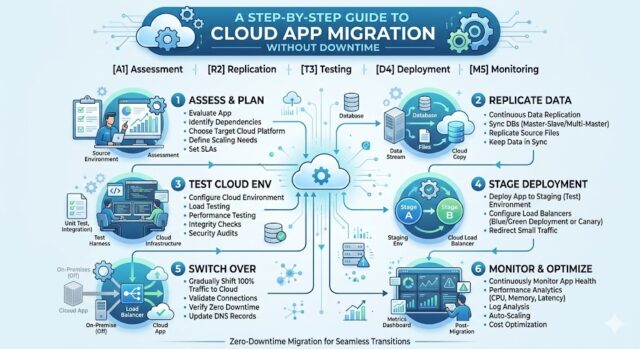
Table of Contents
Why Businesses Are Moving Legacy Applications to the Cloud
Legacy systems often run on outdated infrastructure that is expensive to maintain. Migrating them to the cloud offers significant advantages.

Scalability
Cloud infrastructure allows businesses to scale resources instantly depending on demand.
Cost Optimization
Companies only pay for the resources they use instead of maintaining expensive hardware.
Security Improvements
Major cloud providers offer enterprise-grade security features and compliance frameworks.
Performance
Modern cloud architecture dramatically improves application speed and reliability.
Organizations using professional cloud migration services often experience faster deployments and improved system resilience.
Challenges of Legacy Application Migration
Before discussing the migration process, it is important to understand the challenges.
Downtime Risk
Applications may become unavailable during data transfer or infrastructure changes.
Data Integrity
Sensitive data must be transferred safely without corruption.
Compatibility Issues
Older systems may not work properly with modern cloud environments.
Complex Dependencies
Legacy systems often rely on multiple services and integrations.
Without proper planning, these challenges can delay your ability to successfully migrate app to cloud infrastructure.
Key Strategies for Zero Downtime Cloud Migration
A well-planned migration strategy ensures business continuity.

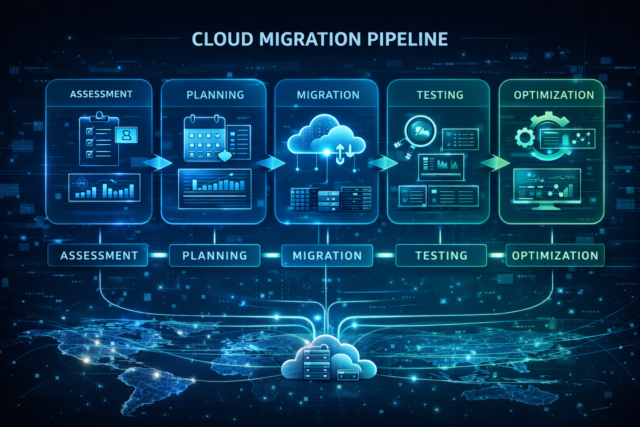
1. Perform a Complete Application Assessment
Start by auditing your application architecture.
Evaluate:
Databases
APIs
Dependencies
Infrastructure
Security policies
This step helps determine the best migration approach and prevents surprises during the process.
Professional cloud migration services usually begin with this detailed discovery phase.
2. Choose the Right Cloud Migration Strategy
There are several approaches depending on your application complexity.
Rehosting (Lift and Shift)
Move the application without modifying code.
Best for:
Fast migration
Minimal development effort
Replat forming
Make small optimizations while keeping the core architecture.
Best for:
Improving performance
Reducing costs
Refactoring
Redesign the application for cloud-native architecture.
Best for:
Long-term scalability
High performance
Choosing the correct strategy helps achieve a seamless migration with minimal disruptions.
3. Use Parallel Environments
One of the most effective ways to avoid downtime is running both environments simultaneously.
How it works
Existing system continues running
Cloud environment is deployed
Data is synced between systems
Traffic gradually shifts to the cloud
This method ensures users never experience interruptions while you migrate app to cloud infrastructure.
4. Implement Data Synchronization
Data consistency is critical.
Tools and techniques include:
Database replication
Real-time synchronization
Incremental backups
Event streaming
These approaches help maintain accuracy during the migration process.
Leading cloud migration services rely heavily on automated synchronization to ensure a smooth transition.
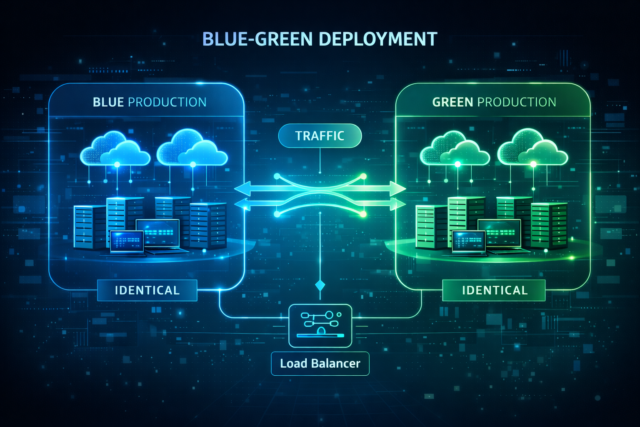
5. Use Blue-Green Deployment
Blue-green deployment is a powerful strategy for seamless migration.
Process
Blue Environment → Current production
Green Environment → New cloud environment
Steps:
Deploy application in the cloud
Test in isolation
Switch traffic when ready
If issues appear, traffic can immediately return to the original system.
This dramatically reduces migration risk.
6. Automate Testing
Testing ensures the new system behaves exactly like the old one.
Tests should include:
Performance testing
Security validation
Load testing
Integration testing
User acceptance testing
Automation tools can simulate thousands of users to confirm stability.
7. Monitor Everything During Migration
Real-time monitoring allows teams to quickly detect issues.
Important metrics include:
Latency
Error rates
Resource usage
Database performance
API response time
Monitoring tools make the entire migrate app to cloud process more predictable.
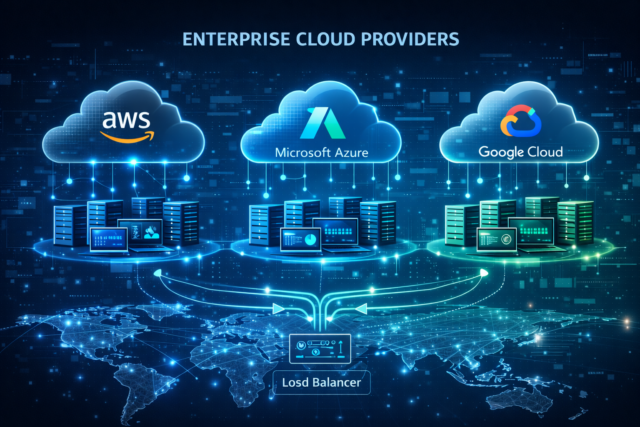
Selecting the Right Cloud Platform
Choosing a cloud provider plays a huge role in migration success.
Factors to consider:
Pricing
Scalability
Security
Integration capabilities
Global availability
If you’re unsure which platform is best, read our detailed comparison:
➡ Azure vs AWS vs Google Cloud: Which is Best for Your Project?
This guide explains strengths, pricing models, and use cases for each platform.
Common Mistakes to Avoid During Cloud Migration
Many organizations experience setbacks because of avoidable mistakes.
Skipping Planning
Migration without strategy often leads to downtime and cost overruns.
Ignoring Security
Cloud environments must be configured properly.
Underestimating Data Transfer Time
Large datasets require careful scheduling.
Lack of Testing
Skipping tests can break production systems.
Working with experienced cloud migration services helps avoid these issues.
Benefits of a Seamless Cloud Migration
A successful migration provides measurable benefits.
Improved Performance
Cloud infrastructure improves system speed and responsiveness.
Better Disaster Recovery
Automated backups and redundancy improve resilience.
Global Availability
Applications can be deployed closer to users worldwide.
Faster Innovation
Teams can launch new features much faster.
Businesses that migrate app to cloud environments often see immediate operational improvements.
When Should You Migrate Your Legacy Application?
Here are some signs it’s time:
Infrastructure costs are rising
Performance issues are increasing
Security risks are growing
Scaling is difficult
Maintenance is becoming complex
If these problems sound familiar, it may be time to invest in professional cloud migration services.
Why Work With Cloud Migration Experts
Cloud migration is a complex technical process involving architecture, infrastructure, security, and DevOps.
Experienced providers help with:
Migration planning
Risk mitigation
Infrastructure setup
Data transfer
Optimization
They ensure your transition is efficient and truly seamless.
Start Your Cloud Migration Journey Today
Migrating legacy systems doesn’t have to disrupt your business. With the right strategy, tools, and experts, you can migrate app to cloud environments smoothly while maintaining uptime.
Our team specializes in cloud migration services that help organizations modernize infrastructure with zero downtime.

What We Offer
End-to-end cloud migration
Application modernization
Infrastructure optimization
Security implementation
Performance monitoring
👉 Explore our Cloud Solutions Services
or
👉 Contact Us Today to discuss your migration project.
FAQs
Migrate App to Cloud Without Downtime
What are cloud migration services?
Cloud migration services help businesses move applications, databases, and infrastructure from on-premise systems or old servers to modern cloud platforms. These services include planning, testing, data transfer, security setup, and optimization to ensure a smooth and seamless migration with minimal disruption.
How can I migrate app to cloud without downtime?
You can migrate app to cloud without downtime by using strategies such as:
Blue-green deployment
Parallel environments
Database replication
Traffic shifting
Automated testing and monitoring
These techniques allow your existing system to keep running while the new cloud environment is being deployed.
What is seamless migration in cloud computing?
Seamless migration means moving an application, data, and infrastructure to the cloud without interrupting users or business operations. It involves careful planning, data synchronization, testing, and gradual traffic switching to ensure continuous availability.
How long does cloud migration take?
Cloud migration timelines vary depending on:
Application complexity
Data size
Infrastructure dependencies
Migration strategy used
Simple applications may migrate in a few days, while complex enterprise systems can take weeks or months when using professional cloud migration services.
What are the risks of migrating legacy applications to the cloud?
Common risks include:
Unexpected downtime
Data loss
Security misconfiguration
Compatibility issues
Performance problems
These risks can be reduced through proper planning, testing, and working with experienced migration experts.
Which cloud platform is best for migration?
The best platform depends on your project requirements such as scalability, pricing, and integrations. The most popular options include:
Microsoft Azure
Amazon Web Services (AWS)
Google Cloud Platform
You can read our detailed comparison here:
Azure vs AWS vs Google Cloud: Which is Best for Your Project?
What is the cost of cloud migration services?
The cost of cloud migration services depends on:
Application size
Infrastructure complexity
Data transfer requirements
Security and compliance needs
Migration strategy
Some migrations cost a few thousand dollars, while large enterprise migrations can require a larger investment.
Should I refactor my application before cloud migration?
Not always. There are multiple approaches:
Lift and shift – move the app as it is
Replat forming – small improvements
Refactoring – rebuild for cloud-native architecture
The best option depends on your business goals and timeline.
What tools are used for cloud migration?
Common migration tools include:
AWS Migration Hub
Azure Migrate
Google Cloud Migrate
Kubernetes
Docker containers
CI/CD pipelines
These tools help automate the process and support seamless migration.
Why should businesses migrate legacy applications to the cloud?
Businesses choose to migrate app to cloud environments to improve scalability, reduce infrastructure costs, enhance security, and enable faster innovation. Cloud platforms also allow companies to serve users globally with better performance.